The festive menu is the busiest menu of the year, and it changes faster than any other. New dishes go on in November. Christmas Day gets its own set menu. New Year's Eve is still being argued about in the office. At the same time the rota fills up with agency chefs and seasonal staff who have never cooked your food before.
That is exactly when allergen questions get harder to answer. A customer asks if the pudding contains nuts. The person on the pass started on Tuesday. Somebody needs the right answer, quickly.
CompliChef keeps the whole festive menu in one place, from the recipe to the printed menu to the Cookbook your team reads before service.
Built by a chef, for busy seasons like this one
CompliChef was built by a chef and has been used in real UK kitchens since 2018. Christmas is where the gaps in paper systems show up: the recipe file that never got updated, the allergen sheet for last year's menu, the new starter who was told the stuffing "should be fine".
The aim is simple. Write each dish down properly once, then let everyone read the same version.
Step 1: Build each festive dish in Recipes
Start in Recipes. Each recipe card holds what the kitchen and the office both need to know:
- Allergens, shown as clear icons on the card, using the 14 major allergens
- Critical Control Points, such as "Cook to 75°C throughout" for a roast turkey
- Food cost, menu price and gross profit, worked out on the card as you set the price
- Nutrition, recipe total, covering energy, fat, saturates, carbohydrate, sugars, fibre, protein and salt, with a count of how many ingredients have been calculated so far
- Can be adapted, for dishes that can be made gluten-free, for example
- Cooking steps and a short description, so the dish reads the same for everyone
Ingredients live in their own Ingredients tab, and the Sync prices from Click & Collect option sits at the top of the page next to Add Recipe and Add Ingredient.
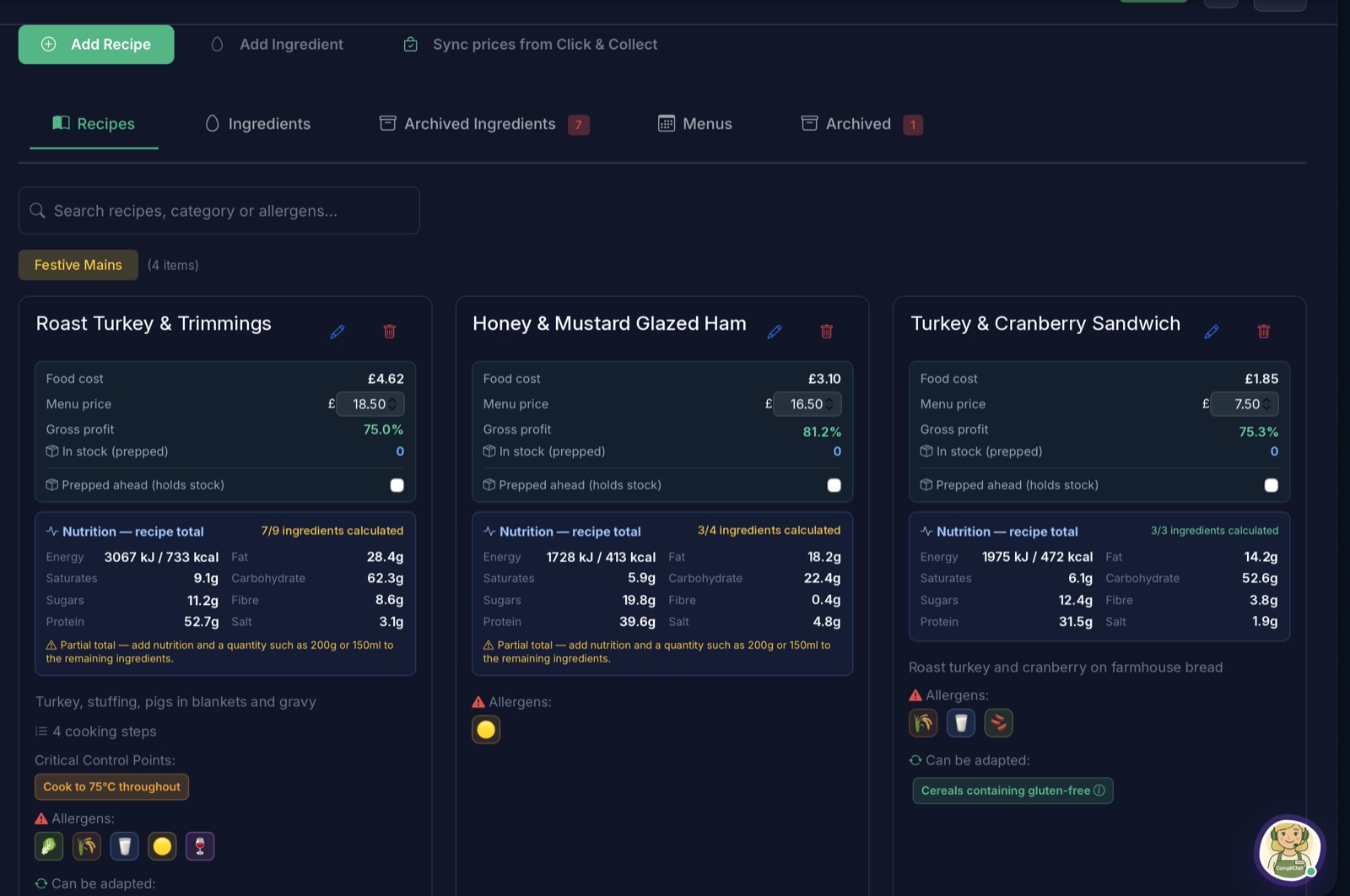
Example recipes and figures.
If the nutrition total is only partial, CompliChef says so and prompts you to add nutrition and a quantity to the remaining ingredients. That is useful when you are building a lot of new dishes in a short space of time.
Step 2: Put the festive menu together in Menus
Once the dishes exist, open Menus and choose Create New Menu. A menu has a name, a season and a date range, so you can run more than one at once:
- Festive Menu, Winter, running 01 Nov 2026 to 08 Jan 2027, with 14 recipes
- Christmas Day Menu 2026, Winter, for the days around Christmas
- New Year's Eve Menu, saved as a draft until it is signed off
Build menu lets you add and remove recipes, View menu shows the finished menu, and older menus can be moved to Archived when the season is over.
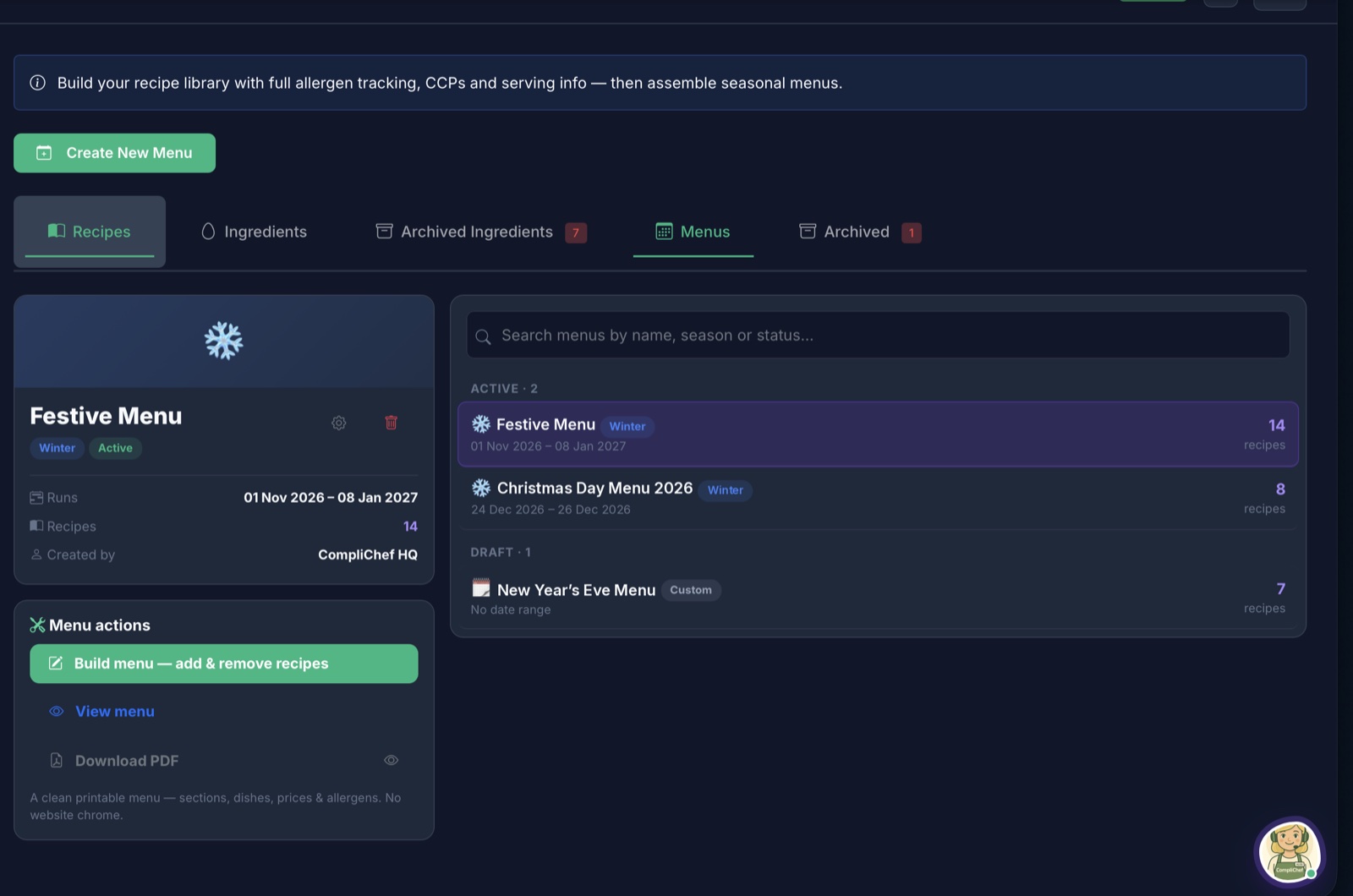
Download a printable PDF
Download PDF produces a clean printable menu with sections, dishes, prices and allergens, without any website chrome. Handy for the pass, a staff briefing, or a copy front of house can refer to.
Step 3: Staff read the festive menu in the Cookbook
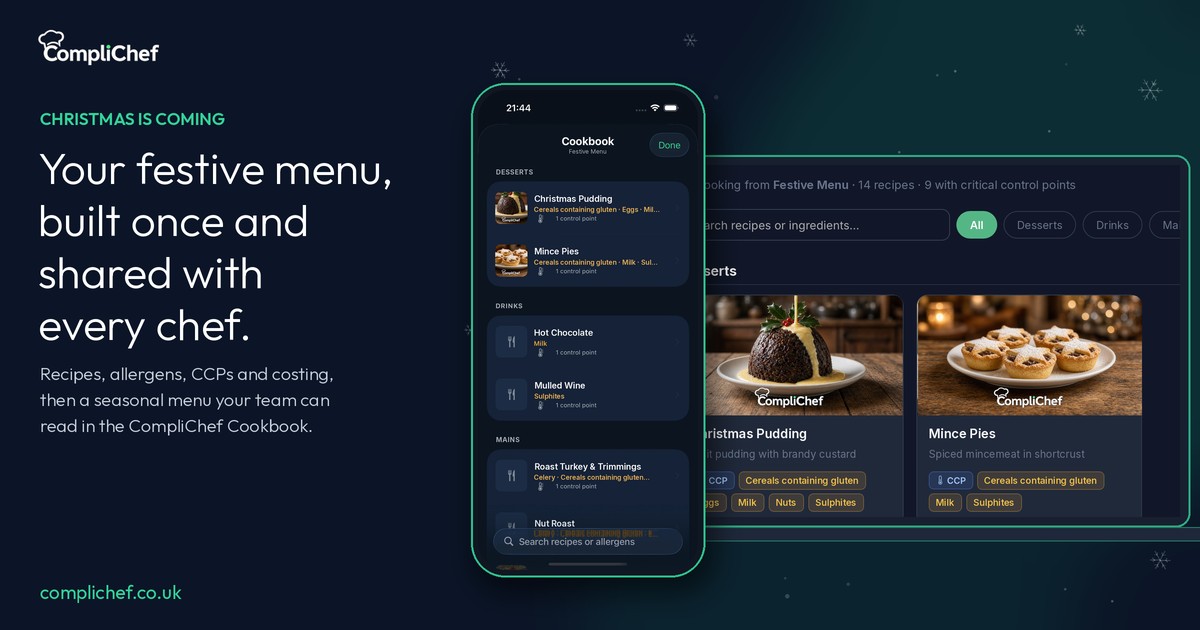
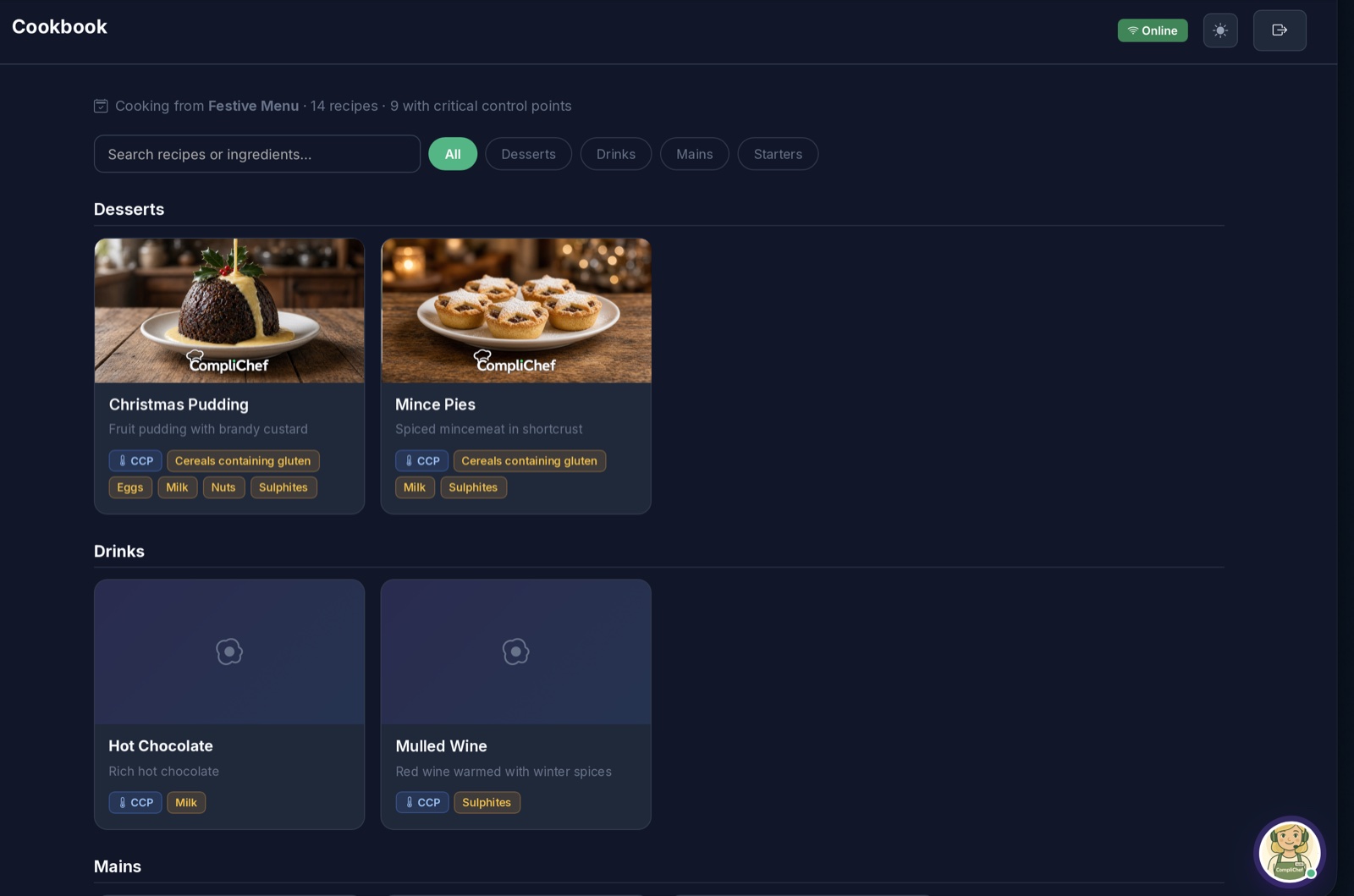
This is where it comes together for the team. The Cookbook shows which menu the kitchen is cooking from, for example "Cooking from Festive Menu, 14 recipes, 9 with critical control points".
On the web, dishes are grouped by section, with filters such as Desserts, Drinks, Mains and Starters. Each card shows the dish, a short description, a CCP badge where there is a control point, and the allergens in plain words: Cereals containing gluten, Eggs, Milk, Nuts, Sulphites and so on. Search covers recipes and ingredients.
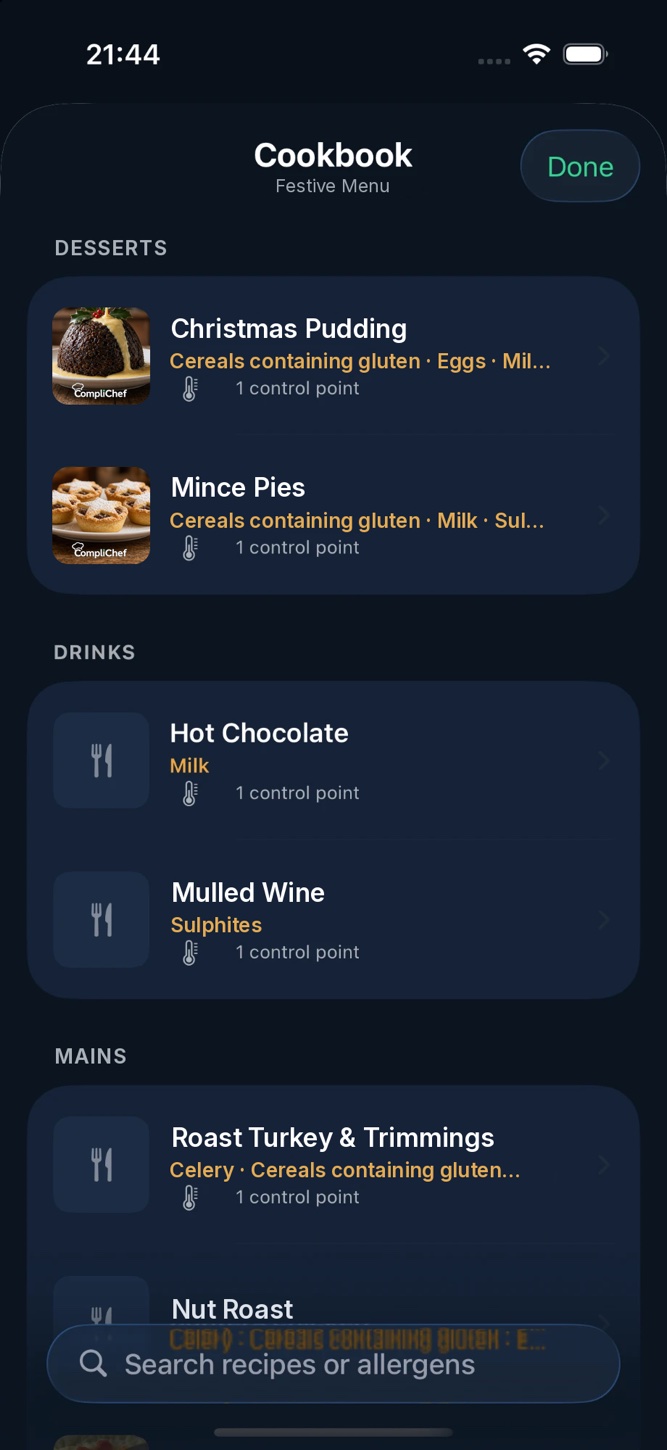
On the phone app the same Cookbook sits in the hand. Staff can scroll by section, see the allergens and the number of control points for each dish, and search recipes or allergens. A new chef can check the mince pies before service without hunting for a folder.
Allergens at Christmas: getting the basics right
Festive food is full of allergens. Christmas pudding, mince pies, stuffing, pigs in blankets, gravy, nut roast and mulled wine between them can cover gluten, milk, eggs, nuts, celery, mustard and sulphites. In the UK, food businesses must be able to tell customers if any of the 14 major allergens are in the food they serve. That information has to be accurate and up to date, which is hard when the menu has just changed.
If you are also selling food that is prepacked for direct sale, such as boxed festive sandwiches or mince pies packed on site, Natasha's Law applies. Since October 2021 that food needs a label with the name of the food and a full ingredients list, with allergens emphasised.
Keeping the recipe, the menu and the Cookbook in the same place means the answer a customer gets matches the dish on the plate.
A festive checklist for your kitchen
- Add every new festive dish in Recipes with allergens and any CCPs.
- Set a menu price and check the gross profit before the menu goes live.
- Create the Festive Menu with its date range, plus any one-off menus like Christmas Day.
- Keep New Year's Eve as a draft until it is final.
- Download the PDF for the pass and for front of house.
- Ask every chef, including agency and seasonal staff, to read the Cookbook before their first festive shift.
Get your festive menu ready
If you want this Christmas to be the one where everyone is working from the same menu, start a 14-day free trial. Built for UK hospitality, by a chef, and used in real kitchens since 2018.